Exportable Workouts
Exportable workouts, or often known as "structured workouts," are workouts that are formatted in a specific way so you can export them to your sport watch, smart bike trainer, or external software like Zwift.
A sport watch can then e.g. tell you when to start a new interval or recovery block, or your smart bike trainer can automatically be set to the power output of the training block.
Coachbox can also estimate the "Stress Score" for a workout based on a structured workout, which allows the inclusion of the workout in the "Coachbox Fitness Trend" graph, without the workout having been performed. This is useful when planning ahead with a specific goal in mind.
Exportable workouts can also use the thresholds. Saving the exportable workouts in your workout library can give you a huge efficiency boost. For example, you can format exportable workouts based on percentages of thresholds or zones, and when scheduling an exportable workout from the library across multiple athletes, the correct thresholds of each individual athlete are applied each time. More information about the workout library can be found on this page.
How do I create an exportable workout?
When you create a new, planned workout, you can now click on "exportable segments" in addition to the "free segments" tab. When you click on the "exportable segments" tab, the workout is automatically transformed into an exportable workout and you can start formatting the different blocks of the workout.
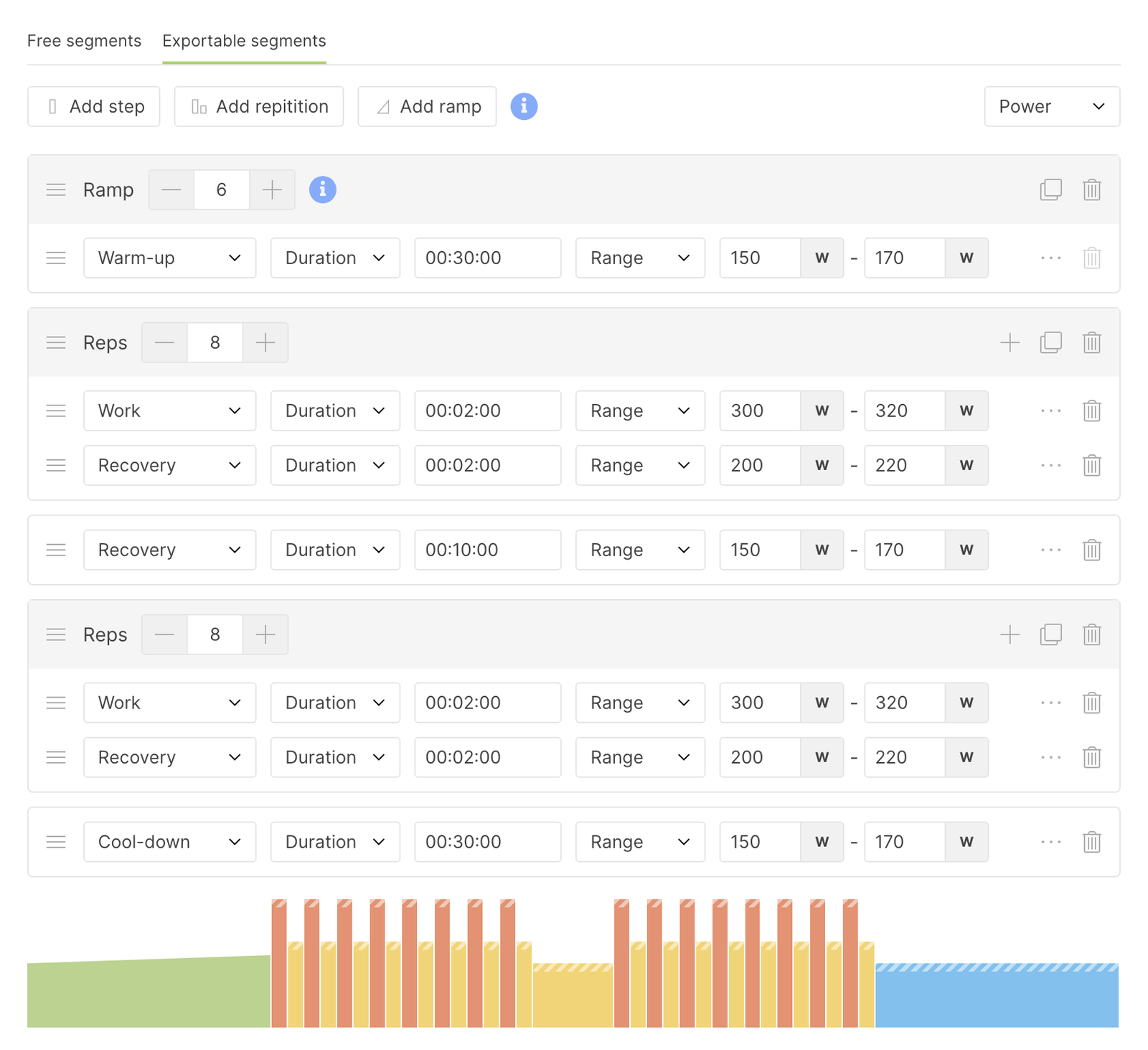
Exportable workouts can be formatted based on heart rate, speed, pace or power. To change the type, click on the drop-down menu in the toolbar.
Then you can add three types of blocks:
Step:
- A step represents a single block that the athlete must perform
- A step you give either a duration (e.g. 20 minutes) or a distance (e.g. 5 km).
- A step has either:
- A target value (e.g. 200W)
- A range value (e.g. between 200W and 220W)
- A threshold target value (e.g. 60%)
- A threshold range value (e.g. between 70% and 80%)
- A zone
- An exportable workout always consists of at least one or more steps and can also be combined with "repetition" or "build-up" blocks.
Repetition (reps):
- A repetition can contain one or more steps.
- Steps can be added by clicking on the "+" icon on the right in the title bar of the repetition.
- You can choose how many times the repetition should effectively repeat by clicking on "-" and "+" next to the repetition number in the title bar of the repetition.
- You can also add steps by dragging them into the repeat. Segments, repeats and build blocks can be dragged using the drag icon on the left.
Build-up (ramp):
- A build-up block contains one or more "step" blocks. The step blocks contained in a build-up segment then build up (or down) to the value of the step block.
- Not all workout formats support "build" blocks. To get around this, in the workout formats that do not support "build" blocks, the build is split into a number of "normal" steps. You can control how many steps are exported in this case, by clicking on "-" and "+" next to the number in the title bar of the build block. This gives you the possibility to make the exports for the build blocks smoother or less smooth.
Note: When you use a "target" block under a "build", it always builds from 0 to the target value. When you use a range step, you can decide from which value to which value the build should take place.
TIP: You can also use "build up" blocks to decrease to a certain value. You don't always have to build up from a low value to a higher value. You can also start with a higher value and work down to a lower value.
Which totals end up on the card
Every structured workout gets a duration and a distance on its card, and those two numbers feed your week totals on the calendar. Which of the two Coachbox fills in depends on how you built the blocks, and on one setting you choose yourself.
A session built in one unit
Build the whole session in kilometers and it gets a distance and no duration. Build it in time and it gets a duration and no distance. By default Coachbox does not estimate the missing total, so your week totals count exactly the kilometers and the time you typed yourself.
Prefer to see the other total as well? Turn on Estimate the missing duration or distance (see below). A 10 km run at 4:15 to 4:00 min/km then gets a duration of about 41 minutes and an average pace, and those 41 minutes count in your week's hours.
A session that mixes both units
Mix both inside one session (2 km warm-up, then 20 minutes of fartlek) and neither total describes it on its own. Coachbox then always fills in both, whatever the setting: the kilometers of the fartlek block are worked out from its prescribed pace, the time of the warm-up block likewise.
Estimate the missing duration or distance
You find this setting under your profile picture at the top right, Settings, tab Preferences, section Calendar preferences.
| Your session | Setting off (default) | Setting on |
|---|---|---|
| 10 km at 4:15 to 4:00 min/km | 10 km, no duration | 10 km, about 41 minutes |
| 40 minutes at 12 km/h | 40 minutes, no distance | 40 minutes, 8 km |
| 3 km easy, 40 minutes fartlek, 3 km easy | both totals | both totals |
| 60 minutes on power or heart rate | 60 minutes, no distance | 60 minutes, no distance |
Good to know:
- Leave it off if you plan in kilometers and want your week to show exactly the kilometers you planned. With the setting on, every session built in time adds estimated kilometers to that week total.
- Turn it on if you want every session to show both its duration and its distance, for example to compare the hours of a week.
- Only for pace or speed. A block on power or heart rate says nothing about how fast the athlete travels, so there is nothing to convert.
- A range counts at its midpoint. For 4:15 to 4:00 min/km Coachbox uses the speed halfway in between.
- It is an estimate. It uses the pace you prescribe, not the pace the athlete ends up running.
- Existing workouts do not change by themselves. The setting applies when you change the blocks of a workout, and when you copy or move a workout or drag one from the library. A workout you already planned keeps its totals until you change one of its blocks.
- It is your own setting. Every coach in a team chooses for themselves. It applies to the workouts you build or place.
How do I place my exportable workouts on my training device?
When you create exportable workouts, you want to be able to use them on your training device or watch. To do this, you need to download the workout as a .fit-file or .zwo-file, and place the downloaded file on your training device.
For more information on how to do this, take a look at one of the following pages: