Wahoo
Coachbox sends structured workouts directly to your Wahoo ELEMNT head unit through the Wahoo Cloud API. There is no manual download or import step: once you send the workout, it appears automatically on your device via the Wahoo app.
How the automatic sync works
When you send a workout:
- Coachbox converts it to Wahoo's Plans format (power, heart rate, cadence and speed targets, interval structure).
- The workout is pushed to your Wahoo account through the Wahoo Cloud API.
- The Wahoo app on your phone picks it up on its next sync.
- When your ELEMNT connects to the Wahoo app, the workout is ready in the Workouts menu.
You never need to download a FIT file and import it. The link between Coachbox, your Wahoo account and your head unit handles that for you.
Rather not send every workout by hand? Turn on Automatically submit scheduled workouts. Coachbox then stages your next workout (up to 2 days ahead) as soon as you save or change it, with a nightly check on top. A workout planned further out is picked up automatically once it enters that window. Sending by hand works for any scheduled workout.
Prerequisites
- Your Wahoo account is connected to Coachbox through Settings → Sync (see Set up synchronisation)
- Your ELEMNT is paired with the Wahoo app on your phone
- The workout is a cycling or running session (indoor or outdoor). Other sports are not supported by the Wahoo Plans API.
- The workout is scheduled in your calendar. How far ahead does not matter.
Sending a workout
From the web app
- Open the planned workout in your calendar
- Click Sync with Wahoo (Wahoo icon in the action buttons, or through the export menu)
- The workout shows up shortly after the next sync in your Wahoo app and on your ELEMNT
If the same workout was sent before, Coachbox overwrites the existing version on Wahoo. No duplicates.
From the mobile app
- Open the planned workout
- Tap the Wahoo button in the export screen
- Open the Wahoo app so your ELEMNT can sync
Prefer to do it manually with a .fit file?
The automatic sync is the easiest route, but you can also download an exportable workout as a .fit file and put it on your Wahoo yourself. Open the workout, click Export and choose the .fit option.
On a Mac: install the free "Android File Transfer" program via this link. Connect your Wahoo via USB, drag the .fit file into the "plans" folder and disconnect the device.
On a PC: connect your Wahoo via USB, open the device in Windows Explorer through "USB storage" and drag the .fit file into the "plans" folder.
After disconnecting, the workout is ready under "planned workouts" on the device.
Supported target types
The Wahoo Plans API supports:
- Power targets (absolute watts or zones)
- Heart rate targets (BPM or zones)
- Cadence targets (RPM)
- Speed / pace targets (running)
- Interval structure (work, rest, repeats, ramp-up and ramp-down)
Troubleshooting
"Reconnect Wahoo" appears
To send workouts to your device, Coachbox needs permission to write plans to your Wahoo account (plans_write scope). Links from before this feature are missing that permission. You also end up here if you leave a box unchecked while connecting: Coachbox still imports your rides, but cannot push workouts back.
Fix: click Reconnect Wahoo in the notice. You land on Wahoo's authorization screen. Keep every box ticked there, especially "Access your plans" and "Update your plans". If you uncheck them, Coachbox cannot send workouts to your device.
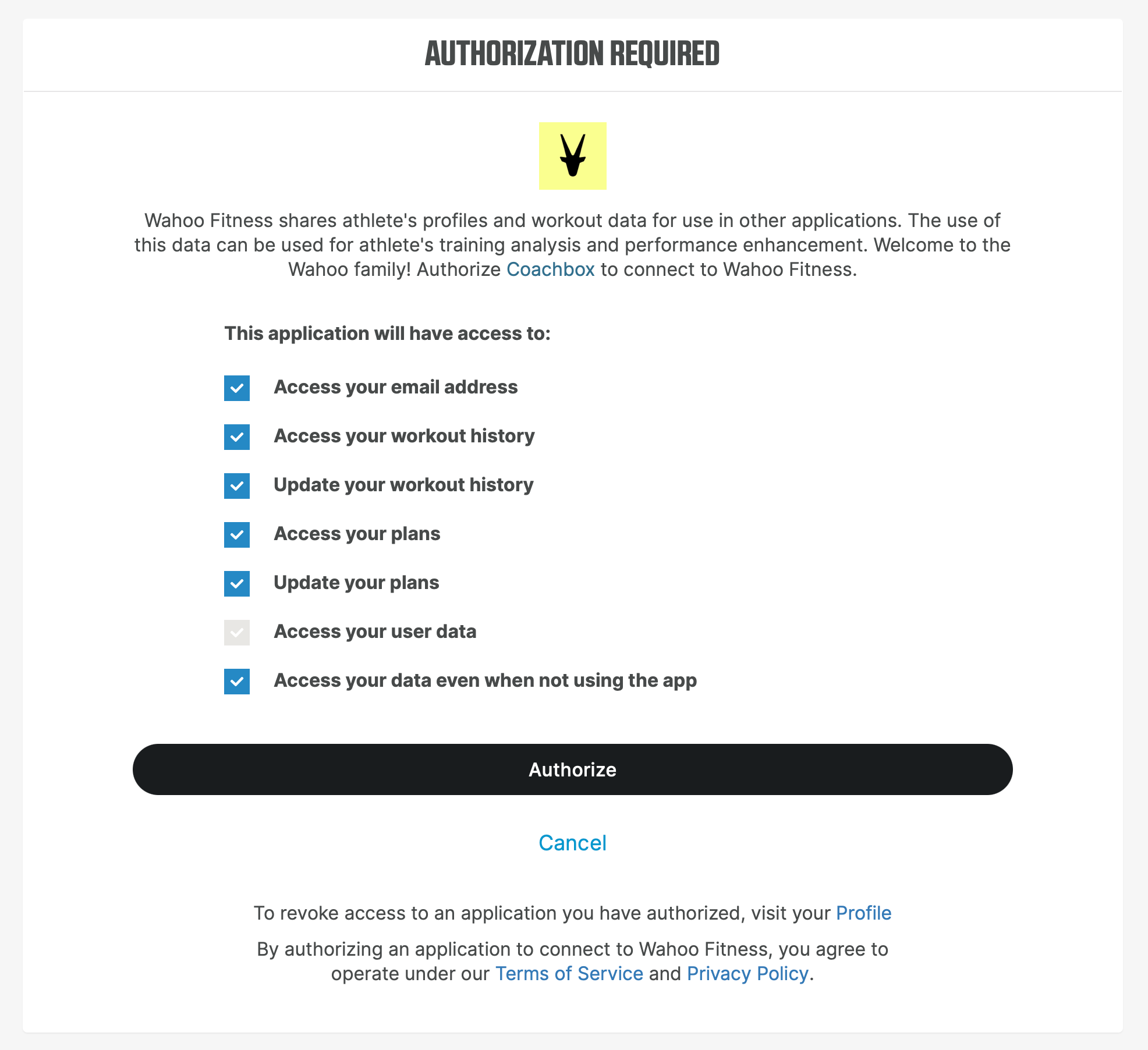
Then click Authorize. The sync works immediately afterwards.
The Wahoo button does not appear
- Sport not supported: Wahoo only supports cycling and running workouts. For swimming or strength, the option is intentionally hidden.
- Wahoo account not linked: go to Settings → Sync and connect your Wahoo account.
I get an error when sending
First check that your Wahoo account is still linked under Settings → Sync, and that the workout is a cycling or running workout. If the error keeps coming back, let us know at support@coachbox.app with the date and name of the workout.
The workout is not on my ELEMNT
- Open the Wahoo app on your phone: workouts reach your head unit through the app
- Check that your ELEMNT is connected and has synced recently
- New workouts usually show up within seconds. If there is a long delay, close the Wahoo app and reopen it.
Good to know
- Re-sending overwrites: if you update the workout in Coachbox and send it again, the Wahoo version is updated in place.
- Planned workouts only: you cannot send completed workouts to Wahoo, only future planned sessions.
- One link, both directions: the same Wahoo connection that imports your completed workouts is used for the export.