Managing Athlete Settings
As a coach, you can view and edit your athletes' profile information, control how far ahead they can see their training plan, and manage their visibility settings.
Viewing an athlete's profile
You can open the profile from two places:
From the calendar
- Click the name of the active athlete in the top left corner to open the athlete selector
- Hover over the athlete and click the menu icon (⋮) that appears
- Choose Show profile
From your account page
- Click on your profile picture in the top right corner
- Go to the Athletes tab
- Click on the athlete's name, or choose Show profile in the row's dropdown menu (⋮)
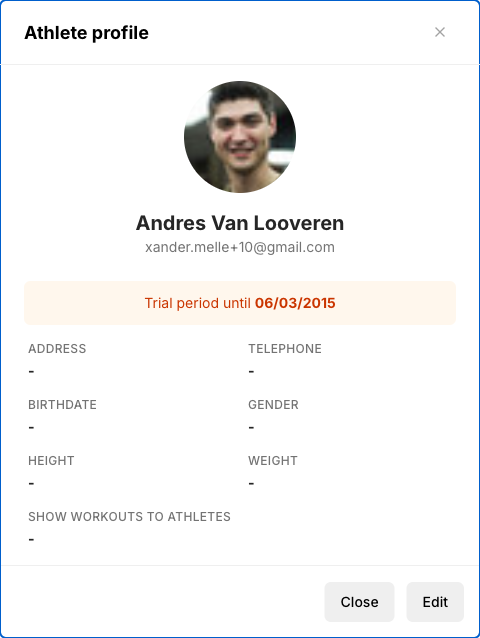
Both routes open a read-only view of the athlete's profile.
Viewing an athlete's linked platforms
The profile has a Synchronisation tab that lists the platforms the athlete has linked (Garmin, Polar, Suunto, ...) together with the moment each one last synced. This is read-only: linking or unlinking a platform can only be done by the athlete, from their own synchronisation settings.
Use this tab when workouts are not coming in: it shows at a glance whether the athlete linked a platform at all, and whether that link has ever synced.
Editing an athlete's profile
- Open the athlete's profile (see above)
- Click Edit profile in the athlete's dropdown menu (⋮), or navigate to the edit URL directly
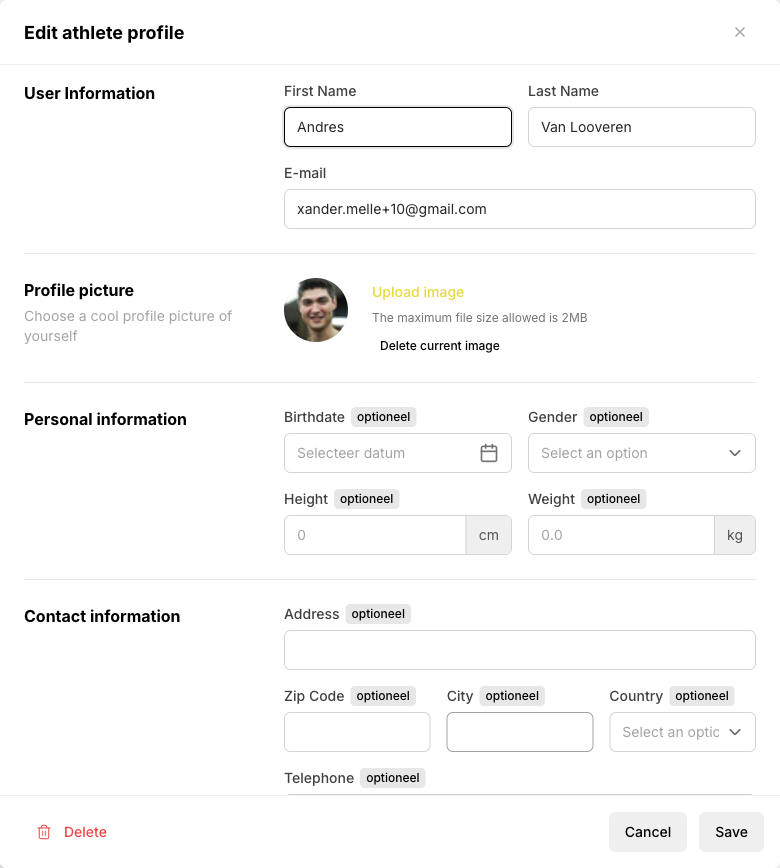
User information
- First Name and Last Name — The athlete's name
- E-mail — The athlete's email address (used for login and notifications)
Personal information
- Birth date — Date of birth
- Gender — Used for certain calculations and defaults
- Height and Weight — Physical measurements (supports both metric and imperial units)
Contact information
- Address, Zip code, City, Country — Postal address
- Phone number — With country prefix
Coaching visibility
These settings are only visible to coaches and team admins, and only for athletes (not for other coaches):
- Coaching weeks advance — Controls how many weeks ahead the athlete can see their planned training. This overrides the team default for this specific athlete.
- Show annual plan to athletes — Whether this athlete can view their annual training plan.
Good to know
- Changes are saved when you click Save — there is no auto-save.
- You cannot edit your own profile via the Athletes tab. Use Settings → Profile instead.
- If you change an athlete's email address to one that is already in use by another Coachbox account, an error will be shown.